
How to use a light box for product photos
A light box (also sold as a light tent or photo tent) is a translucent box that surrounds a product with soft, even light. For small products it is the quickest way to get consistent, shadow-light photographs on a clean background, with a phone or a camera, in a room with no good window. It also has limits that are not on the box: it flattens shape, it reflects in anything shiny, and it only works for products that fit inside it with room to spare.
The examples below are real client photographs, shown with permission: the before as it was shot, several of them in light tents, and the after as it was delivered.
What a light box does
Light from a lamp or an LED strip is a small, hard source: it makes sharp shadows and bright, small highlights. The white fabric or plastic walls of a light box spread that light out, so the product is lit by a large, soft surface from several sides at once. Shadows soften and lighten, highlights spread into broad, gentle ones, and the background (a sweep of white or coloured material inside the box) is lit by the same light, so it comes out light and smooth.
That is why light boxes are popular for jewellery, cosmetics, small ceramics, accessories and anything else small enough to fit. For those products the light is flattering and, more usefully, the same every time.
Choosing a light box
- Size. Buy for the largest product you sell, not the typical one, and allow plenty of room: a product that nearly fills the box sits close to the walls, picks up their texture and seams, and leaves no room to angle the camera. As a rule of thumb, look for an interior at least twice your largest product's biggest dimension.
- Built-in lights. Most current boxes have LED strips in the roof. Look for ones you can dim, and for a stated colour rendering figure (CRI) of 90 or more, which keeps colours closer to how they look in daylight.
- Openings. A box with a camera port in the top as well as an opening at the front lets you shoot from above (flat lays, jewellery) as well as straight on.
- Backdrops. White is the most useful. A black backdrop is worth having for metal, glass and light-coloured products.
- Folding. If it has to come down between shoots, choose one that folds flat and goes back up the same way, so each set-up matches the last.
Setting it up
- Put the box on a steady table, away from windows, with the room lights off, so the box is the only light.
- Smooth the backdrop into a curve from the back wall to the floor, with no creases. Put the product forward of the curve.
- Put the camera on a tripod, or the phone in a clamp, level with the product or looking down at the angle you have chosen, and keep it there for the whole batch.
- Set white balance for the box's lights (a custom setting off a grey card, or the camera's daylight preset for most LED boxes) and keep it fixed.
- Expose for the product, then check the brightest part of it still has detail.
Keep the box out of the photograph
The most common light box fault is the box itself. Shoot from too far back or with too wide a lens and the edges of the opening appear in the frame as a dark ring or dark corners. Move closer, or use the phone's 2x or 3x lens and step back, until the frame is filled with backdrop.


Check the backdrop too. White fabric and foam board pick up dust, marks and fingerprints, and a light box lights them beautifully. The pendant below was shot on a board with marks on it and a shadow in one corner, all of which had to be taken out.


Reflections
A light box solves one reflection problem and creates another. Polished metal, glass, glazed ceramics and gloss packaging reflect their surroundings, and in a light box the surroundings are mostly white, which is good. But the opening the camera looks through is dark, and so is the camera, so a shiny product often shows a dark patch exactly where it faces you. A white card with a hole cut for the lens, taped over the opening, removes most of it.
The opposite problem is that an all-white surround leaves shiny products looking flat and grey: polished metal looks bright only where it reflects something dark next to something light. Stand a strip of black card inside the box, just out of shot, to put a dark edge along a ring or a bottle. Move it until the line falls where it shows the shape.
What a light box cannot do
- Large products. Once the product is more than about half the width of the box, the light stops being even and the walls appear in shot. Bags, shoes, small furniture and anything bulky needs a larger set: a white wall or a roll of paper, with window light or two soft lights.
- Shape and texture. Light from every side is flat. Knitwear, leather grain, carved wood and embossed packaging can look smoother than they are. Turn off or cover the lights on one side to bring texture back.
- Scale. A product photographed alone in a light box gives a buyer nothing to judge its size by. Take one extra photograph with something familiar next to it, or on a hand, outside the box.
- Pure white. The backdrop of a light box usually comes out very light grey rather than white, often darker towards the back. See how to get a pure white background for what to do about it.


Using a light box for jewellery
Jewellery is what most small light boxes are bought for, and it is where they need the most help. Use the top port for flat lays of necklaces and bracelets, and a small stand or putty, kept behind the piece, for rings and earrings. Use the camera's macro setting or the phone's main lens up close rather than digital zoom, and focus on the front edge of the stone or the setting. Clean every piece with a microfibre cloth and handle it in cotton gloves, because at that size every fingerprint is visible.
For stones that should sparkle, turn the box lights down and add one small, hard light from outside, through the wall, to put sharp highlights in the facets. The full set of jewellery problems (dust at close range, colour on gold and silver, keeping yourself out of the reflections) is in our guide to how to photograph jewellery.
Making your own light box
A home-made light box works on exactly the same principle, and for a first set of photographs it is as good as a cheap bought one.
- Take a large cardboard box and cut big windows out of both sides and the top, leaving a border of a few centimetres for strength.
- Tape white tissue paper, tracing paper or thin white fabric over the windows.
- Tape a sheet of white card inside, curving from the top of the back wall down across the floor.
- Put two identical lamps outside the box, one at each side, both with the same daylight-balanced bulbs, and a third over the top if you have one.
- Photograph through the open front, with the room lights off.
Matching bulbs matter more than bright ones: two different bulbs give two colours of light, and no single colour correction fixes both. If the paper over the windows shows a bright spot where each lamp is, move the lamps further away or add a second layer.
What to leave for editing
A light box gets you a well-lit product on a light, fairly even background. What it leaves is predictable: a backdrop that is not quite white, a darker area towards the back, seams, dust and marks on the backdrop, the edge of the opening, and dark reflections in shiny surfaces. All of that is routine editing, as the grey backpack below shows: shot in a white cove on a glossy base with a curtain in view, cut out on white with its reflection kept.
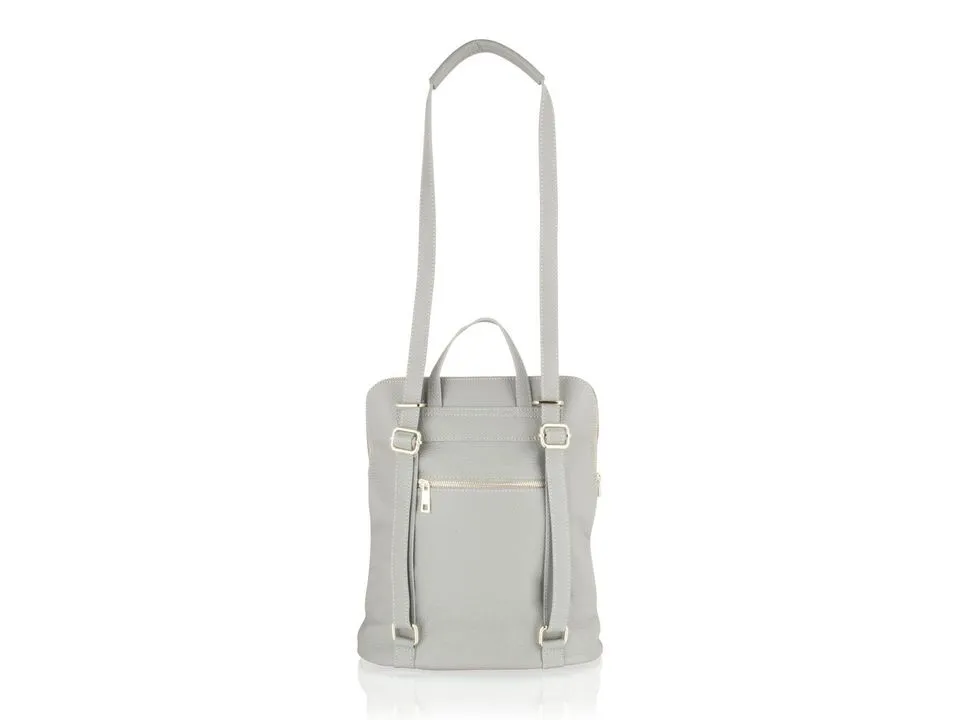

What editing cannot fix is the same as with any set-up: a product out of focus, a highlight burnt to white, or a product that was not cleaned. If you would rather send the photographs as they come out of the box, our product cut-outs put them on pure white, or on any background you need.
Real client images, shown with permission, from the archive of Product Packshot, the Essex product photography studio of Picarm co-owner David Forcina.