
How to photograph jewellery
Jewellery is small, shiny and unforgiving. Every speck of dust shows, polished metal reflects the room you are standing in, and a stone that sparkles in your hand can look like glass on a screen. You do not need a studio to get a photograph you can sell from, but you do need to control three things: what the light is doing, what the metal can see, and how still the camera is.
This guide is about getting those right, and about being clear which problems to solve with the camera and which to leave for editing. The examples are real client photographs, shown with permission: the before as it was shot, the after as it was delivered.
What you need
A phone is enough for most listings. Use the main camera rather than the ultra-wide, which distorts anything close to it, and never use digital zoom: it only enlarges pixels. If your phone has a 2x or 3x lens, use it and step back; a longer lens from further away keeps you and the phone out of the reflections. A macro mode helps with rings and stones, but check the edges of the piece are sharp as well as the middle.
With a camera, a macro lens is the one piece of kit that changes the result. A longer macro lets you fill the frame from further back, for the same reason as above.
Whichever you use, you will also want:
- a tripod, or something solid to rest the phone on, and the self-timer or a remote so pressing the button does not shake the shot;
- one large, soft light source: a window out of direct sun, a light tent, or a softbox;
- two or three sheets of white card or foam board, and one of black;
- reusable adhesive putty to stand rings and earrings up, and a bust or stand for necklaces;
- a lint-free cloth, cotton gloves and a blower brush.
Clean the piece before you start
At the size jewellery is photographed, fingerprints, polishing compound, lint and dust are all visible, and a camera sees them more clearly than you do. Polish each piece, then handle it in gloves. Blow the dust off the piece and the background just before you press the button, not before you set up.


Everything left on the piece is something that has to be taken off afterwards, photograph by photograph. A retoucher can clean grit off a brooch and its background, as above, but a minute with a cloth before the shoot is the cheaper way to the same result, and it makes the edit about the piece instead.
Light: large, soft and from one direction
The main idea to hold on to is that polished metal has no colour of its own in a photograph. It shows whatever is around it. A ring photographed in a kitchen reflects the kitchen. So the job is less about lighting the piece and more about choosing what it reflects.
- Use one large, soft source. A window with indirect daylight, a light tent or a softbox. Put it to one side of the piece and slightly in front. Direct sun, a bare bulb and the phone's flash all make small, hard highlights that burn out to white with no detail in them.
- Turn the room lights off. Daylight and warm indoor bulbs together give you two colours of light on one piece, and no single correction fixes both.
- Surround the piece with white to make silver and gold read bright and clean. White card either side of the piece, or a light tent, does this.
- Add a strip of black where you want a dark edge. A polished band that reflects only white looks flat and grey; a black card held just out of shot puts a dark line along the edge that shows its shape.


Stones are the exception to "soft". Diamonds and cut stones sparkle when small, bright points of light hit their facets, and soft light alone can make them look dull. A small, bright light or a little mirror aimed at the stone, on top of the soft main light, gives the facets something to catch. Move it until the stone lights up in the camera, not in your eye.
Background: plain, light and curved
Shoot on white or light grey card, curved up behind the piece into a sweep so there is no line where the table meets the wall. Plain card lets the piece be cut out cleanly later, and it puts no coloured reflections into the metal. Velvet, wood and patterned fabric look nice in person, but they put texture and colour into every reflection and make a clean cut-out harder.
You do not need the background to come out pure white in the camera. Trying to get it there by brightening the exposure usually burns out the metal first. Get the piece right and let the background be a little grey: replacing it is routine work, and a marketplace that asks for a pure white background (Amazon does, for the main image) can then have exactly that. Nor does it have to be the background you list on: a piece shot on white card can go on a dark gradient afterwards, and the other way round.


Angles for each kind of piece
Decide on a set of angles and keep to it across a collection. Listings where every ring sits at the same angle and size look like a shop; listings where each one is different look like a drawer.
- Rings: stand the ring upright in a small pea of putty, hidden behind the band. One three-quarter view showing the setting and the band, one side view, and one looking down on the stone. A shot on a hand gives scale, if you want one.
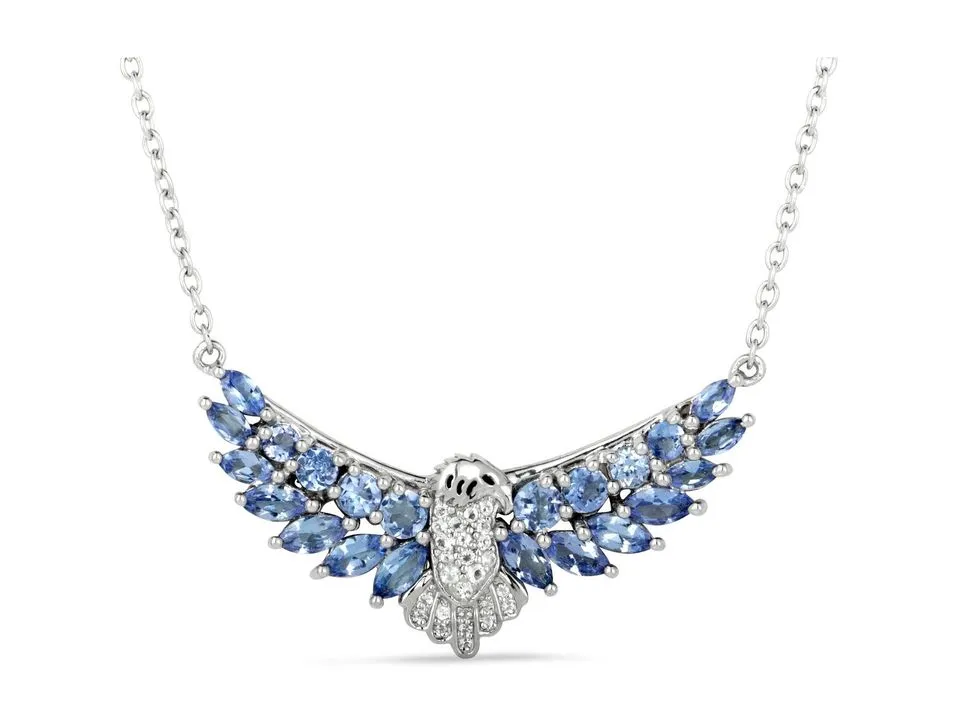
- Pendants and necklaces: hang them on a bust or stand, or lay them flat in a smooth, even curve. Straighten the chain link by link if you have to; a kink in a chain is far quicker to fix with your fingers than in an edit.
- Earrings: photograph them as a pair, one turned slightly towards the camera, with a close-up of one alone. Hang hooks from a thin wire or stand studs in putty.
- Bracelets and bangles: stand them on edge, or lay them in an oval. A cuff stood on edge shows its depth, which a flat photograph hides.


A bust or stand is not a problem for the finished photograph. It holds the chain where you want it, and it can be taken out afterwards, as above, if you want the piece on its own.
Focus, sharpness and settings
On a phone: tap on the part of the piece that matters most (usually the stone) to focus there, then drag the exposure down a little until the brightest part of the metal is no longer pure white. Turn off filters and any "beauty" or portrait mode: artificial background blur often blurs the edges of the piece with it. If highlights on the metal look haloed or oddly flat, try a shot with HDR turned off and compare.
On a camera: put it on a tripod, use the lowest ISO, and stop the lens down to somewhere around f/8 to f/16, because close up the zone that is sharp is very shallow. Set a custom white balance off a grey or white card under your light, and shoot RAW if you can, so the colour can be corrected without damaging the file.
Some pieces are deeper than any setting can keep sharp front to back: a ring shot from the front, a tall setting, a long earring at an angle. The answer is focus stacking: several photographs from a locked-off camera, each focused a little further back, merged into one. Some cameras and phone apps do it for you. If yours does not, shoot the frames anyway and say so when you send them for editing.
Reflections of you and the camera
Look closely at a polished surface in your frame and you will usually find the camera, or yourself, in it. Three things help: step back and use a longer lens; stand the white card close round the piece so it fills the reflection instead of the room; and for the worst cases, cut a hole in a sheet of white card and shoot through it. Small reflections that are left are fine to remove in editing. Just do not try to remove all reflection in camera: metal with nothing in it looks grey and dead.
What to fix in camera, and what to leave for editing
Editing is good at removing things and correcting things. It cannot invent detail the camera did not record. That one rule decides most of this.
| Get right in camera | Fine to leave for editing |
|---|---|
| Focus and sharpness on the stone and the edges | Background to pure white, black or a gradient |
| Highlights with detail in them, not burnt out | A colour cast, and evening out the tone of the metal |
| No camera shake (tripod, timer) | Dust and marks you missed |
| The angle, and the shape of the chain | Reflections of the room, the camera or you |
| A clean piece | Taking out a bust, stand or putty |
| The same framing across a collection | A shadow or a reflection under the piece |
| Enough frames to stack, for deep pieces | The same piece shown in another metal, from one shoot |
If a photograph is soft, shaken or burnt out, shoot it again. It will take less time than any edit, and the result will be better.

Before you list: a quick check
- Zoom in to 100% on the stone. Is it sharp?
- Is there detail in the brightest part of the metal?
- Is there anything in the reflections you would not want a customer to see?
- Does the colour of the metal match the piece in your hand, in daylight?
- Is this piece shot at the same angle and size as the rest of the collection?
If you are photographing products other than jewellery as well, the same ideas carry over, with a few differences; see how to take product photos at home.
Real client images, shown with permission, from the archive of Product Packshot, the Essex product photography studio of Picarm co-owner David Forcina.