
How to photograph clothing for your online store
A buyer cannot touch a garment online, so the photographs have to answer what their hands would: what shape it is, how it hangs, what the fabric is like, what colour it really is. There are three practical ways to photograph clothing without a model: laid flat, on a mannequin, and on a mannequin that is then removed (the ghost or invisible mannequin). Each suits different garments and different shops, and all three depend on the same preparation.
The examples are real client photographs, shown with permission: the before as it was shot, the after as it was delivered.
Prepare every garment first
Most of what makes clothing photographs look second-rate happens before the camera comes out.
- Steam or press it. Creases photograph more strongly than they look, especially across the chest and down the front of trousers. A handheld steamer is quicker than an iron and safer on delicate fabrics.
- De-lint it. A lint roller over the whole garment, then again after it is on the mannequin or laid out. Dark fabrics show every fibre.
- Remove or hide tags. Swing tags, price stickers and loose threads come off; size and care labels stay inside.
- Fill it. Tissue paper inside sleeves, bags and the shoulders of a flat lay gives a garment shape. Keep it out of sight.
- Fasten it. Do up zips and buttons that would be done up when worn, and tie belts the way they are meant to be tied.
Flat lay
A flat lay is the garment laid on a flat surface and photographed from directly above. It needs the least equipment and is the most consistent way to photograph a large range. It suits T-shirts, knitwear, children's clothing, trousers and accessories; it suits fitted and structured garments less, because it cannot show how they hang on a body.
- Surface. A sheet of white foam board or card on the floor or a large table. It should be larger than the garment on every side.
- Camera. Directly above, with the camera or phone level, so the garment is not wider at one end than the other. A tripod with a sideways arm is ideal; standing on a step stool and checking the phone's level indicator works.
- Shape. Smooth the garment flat, then shape it: sleeves slightly angled out, the hem square, the waistband straight. Do it the same way for every garment in a range.
- Light. Soft and even: a large window to one side, with white card opposite. Light from directly overhead flattens texture; light from one side brings it back.


The board does not have to fill the frame. The trousers below were laid on a white board on a wooden floor, with the floor in shot on both sides; the floor is taken out along with the board, as long as nothing covers the garment itself.


On a mannequin
A mannequin shows how a garment hangs and fills out, which matters for dresses, coats, jackets and anything fitted. Choose a dress form close to your sample size, in a neutral colour; white or grey is easier to remove later than flesh tones.
- Pin or clip the garment at the back to take up slack, where the camera cannot see.
- Set the camera at about chest height on the mannequin, level, so the garment is not distorted.
- Use the same mannequin, height and camera position for every garment in a range.
- Take the front, the back, a side or three-quarter view, and close-ups.
- Light from both sides, or one side and a reflector, so the folds have shape but no deep shadows.
Ghost mannequin (invisible mannequin)
The ghost mannequin look shows the garment with the shape a body gives it, but no body: the inside of the neck and the back show where the mannequin was. It is the standard look for a lot of clothing retail, because it keeps the focus on the garment and gives every product the same clean look.
It is made in editing from photographs taken on a mannequin, so it starts at the shoot:
- Photograph the garment on the mannequin, front and back, exactly as above.
- Without moving the camera, photograph the inside of the neck and the back panel. Either remove the mannequin's neck or chest piece if it has one, or turn the garment inside out on the mannequin and shoot the inside of the back.
- Keep the lighting and camera position the same for every shot of that garment, so the parts match when they are put together.

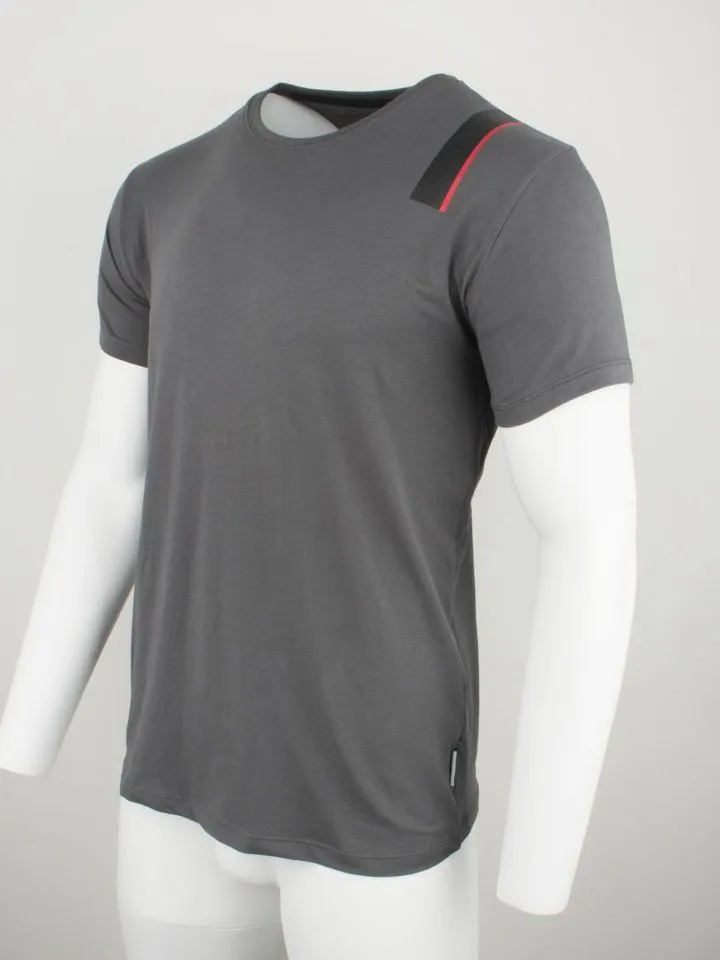
The editor cuts the garment off the mannequin, removes anything left of it (arms, neck, shoulders showing through), and puts the inside back in where the mannequin was. The top below shows that last step: the mannequin's white shoulders showed through the open neckline, and the inside of the back is in their place.


A ghost mannequin can be made from a single shot if the mannequin is removed and the inside is reconstructed, but a real photograph of the inside is always more convincing. If you would rather not do it yourself, this is what our ghost mannequin editing does.
Which to choose
| Method | Best for |
|---|---|
| Flat lay | T-shirts, knitwear, children's clothing, trousers, large ranges, very little space |
| Mannequin | Dresses, coats and fitted pieces where a visible form is acceptable |
| Ghost mannequin | Shops that want a consistent, clean look with a garment's real shape |
| On a model | Showing fit, scale and how a garment moves; usually as well as one of the above, not instead |
The shots every listing needs
- Front, the whole garment, as the first image.
- Back, the whole garment, in the same position.
- Side or three-quarter, for anything fitted or with detail at the sides.
- Fabric close-up, filling the frame, in light from the side so the texture shows.
- Details: buttons, zips, embroidery, pockets, the collar.
- The label, if the brand or the fabric content is a reason to buy.
- Any flaw, close up, if the garment is pre-owned.
Getting the colour right
Colour is where clothing photographs most often let a buyer down. Light every garment with one kind of light, set the white balance from a grey or white card at the start of the session, and compare the photograph on screen with the garment in daylight before you list it. Dark garments are the hardest: black often comes out grey or blue, and navy close to black. Expose so the fabric shows texture rather than flat black, and correct the colour against the real garment, not against what looks good.
What to leave for editing
The board's edge, the floor, the mannequin, pins and clips at the back, a stray thread and small creases are all routine edits. What editing cannot fix well is a garment that was not pressed (large creases can be softened, not removed convincingly), a shape that is lopsided because it was not laid out square, or a colour that was never right in the camera.
Before you list
- Is every garment in the range shot from the same height and distance?
- Does the colour on screen match the garment in daylight?
- Is the fabric's texture visible in at least one shot?
- Are tags, pins and lint gone, or easy to remove?
- Is there a front, a back and a close-up for every garment?
Shooting with a phone? See how to take product photos with your phone for the settings that matter.
Real client images, shown with permission, from the archive of Product Packshot, the Essex product photography studio of Picarm co-owner David Forcina.